










-
 Courier delivery
-
Warranty 1 year
-
Used Product 15 Days
Please provide the link, name, or details of the item(s) you are interested in ordering. I will gladly check and confirm the most accurate, up-to-date price for you before you proceed with your order. Dismiss
₨ 109,330
 Courier delivery
Our courier will deliver to the specified address
2-3 Days
Will be Charged
 Warranty 1 year
 Used Product 15 Days
Payment Methods:
Discover the Cisco Business CBS350-8S-E-2G, an advanced managed switch with 8 Gigabit SFP ports, 2 RJ-45 uplinks, Layer 3 routing, and robust security. Ideal for SMBs seeking high-performance networking.
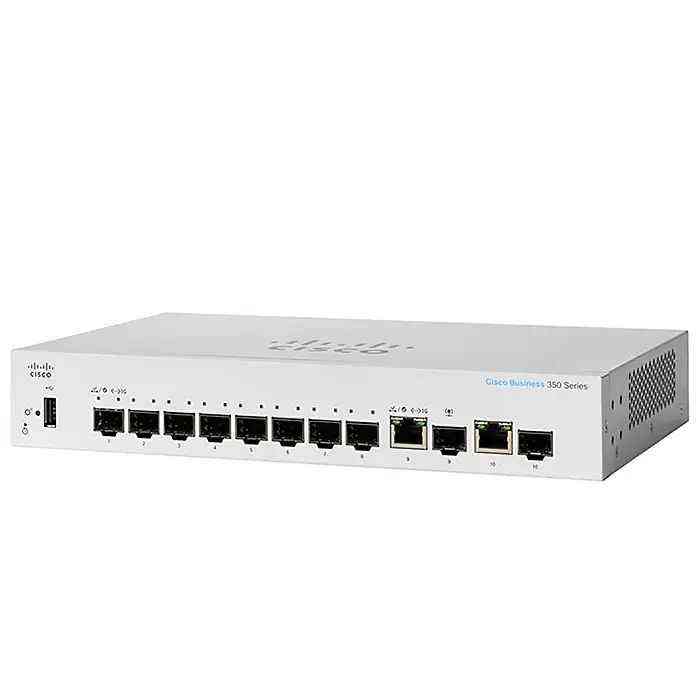
The Cisco Business CBS350-8S-E-2G is a high-performance managed switch designed for small and medium-sized businesses (SMBs) that need enterprise-grade networking solutions. This Cisco Business 350 (CBS350) switch offers advanced security, flexibility, and reliability, making it an excellent choice for organizations that require a robust networking backbone. With eight Gigabit SFP ports and two additional 1G RJ-45 uplink ports, the CBS350-8S-E-2G provides enhanced connectivity options for growing businesses. In this article, we will explore the features, benefits, applications, and technical specifications of this CBS350-8S-E-2G switch, helping you understand why it stands out in the Cisco Business Series.
The CBS350-8S-E-2G is part of Cisco’s 350 Series of managed switches, which are specifically designed to deliver high-end performance while remaining cost-effective for SMBs. This 8-port Gigabit Ethernet switch is equipped with Layer 2 and Layer 3 features, providing essential networking capabilities such as VLAN support, static routing, and security mechanisms.
With Energy Efficient Ethernet (EEE) and fanless operation, this switch is designed for silent operation, making it ideal for office environments where noise reduction is crucial. Additionally, it supports advanced management features, including a web-based UI, CLI, and SNMP, allowing IT administrators to efficiently configure and monitor the network.
The switch includes 8 SFP ports, which allow businesses to establish fiber-optic connections for higher bandwidth and longer distances. This makes it ideal for branch offices, data centers, and remote work environments that require seamless connectivity.
In addition to the SFP ports, the switch also comes with two 1G Ethernet uplink ports, ensuring flexibility in network topology. These ports can be used for direct connections to routers, firewalls, or other switches for increased network efficiency.
Unlike basic Layer 2 switches, the CBS350-8S-E-2G includes static Layer 3 routing, which enables inter-VLAN communication and optimized traffic flow, reducing the need for an external router in small networks.
Cisco has embedded strong security features into this switch, including:
This switch operates silently with a fanless design, making it an excellent choice for office environments, retail stores, and hospitality businesses. It also supports Energy Efficient Ethernet (EEE), reducing power consumption when network traffic is low.
The CBS350-8S-E-2G provides VLAN support, allowing businesses to segment their network for better security and performance. Additionally, Quality of Service (QoS) ensures that critical applications, such as VoIP and video conferencing, receive higher priority to maintain smooth communication.
The CBS350-8S-E-2G and CBS350-8T-E-2G are both part of Cisco’s 350 Series of managed switches, but they differ in terms of port configurations and use cases.
| Feature | CBS350-8S-E-2G (SFP Model) | CBS350-8T-E-2G (RJ-45 Model) |
|---|---|---|
| Port Type | 8 × Gigabit SFP | 8 × Gigabit RJ-45 (Copper) |
| Uplink Ports | 2 × 1G RJ-45 | 2 × 1G SFP |
| Best for | Fiber-based networks (long-distance, high-speed connections) | Copper-based networks (standard Ethernet connections) |
| Flexibility | Requires SFP modules for connectivity | Directly connects to Ethernet devices |
| Power Consumption | Generally lower due to fiber efficiency | Slightly higher due to copper transmission |
Both switches offer advanced Layer 3 features, VLAN support, QoS, and strong security, making them great choices for small to medium-sized businesses looking for a reliable managed switch.
Setting up the Cisco Business CBS350-8S-E-2G switch for optimal performance involves configuring VLANs, security settings, QoS, and management options. Follow these steps to ensure your network runs efficiently:
http://192.168.1.254 to access the web-based GUI.ciscocisco| Feature | Details |
|---|---|
| Model | CBS350-8S-E-2G |
| Ports | 8 × Gigabit SFP, 2 × 1G RJ-45 |
| Layer Support | Layer 2 and Layer 3 (Static Routing) |
| Management | Web GUI, CLI, SNMP, Cisco Business Dashboard |
| Security Features | 802.1X, ACL, DoS Protection, Port Security |
| QoS Support | Yes (Traffic Prioritization) |
| Power Supply | External Power Adapter |
| Energy Efficiency | Energy Efficient Ethernet (EEE) |
| Operating Temperature | 0°C to 40°C (32°F to 104°F) |
| Form Factor | Compact, Fanless Design |
The CBS350-8S-E-2G is an ideal networking solution for SMBs looking for a scalable, secure, and high-performance switch. With Gigabit SFP ports, Layer 3 routing, and advanced security, this switch is well-suited for businesses that demand reliable and future-proof networking infrastructure. By investing in CBS350-8S-E-2G, organizations can enhance network efficiency, reduce downtime, and ensure seamless connectivity for years to come.
 Overview
 Processor
 Display
 RAM
RAM
 Storage
 Video Card
 Connectivity
 Features
 Battery
 General
No account yet?
Create an Account

Reviews
Clear filtersThere are no reviews yet.