










-
 Courier delivery
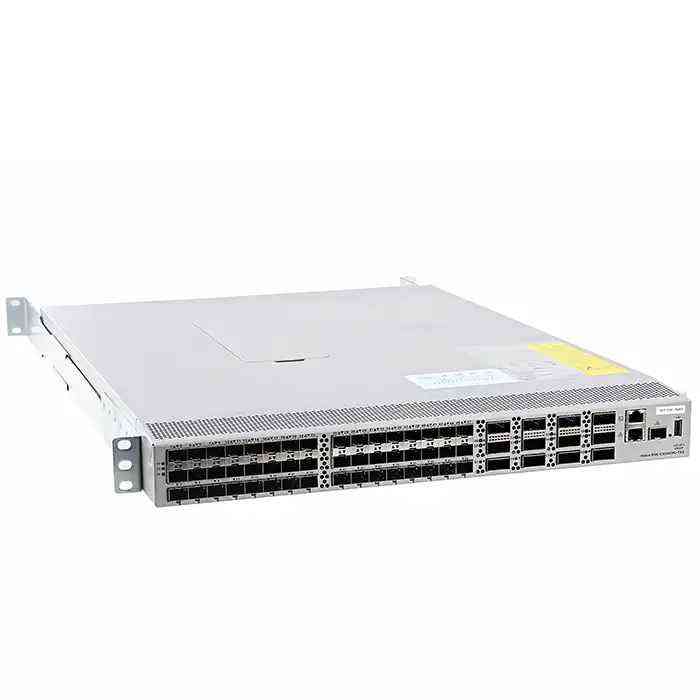
Cisco N9K-C93240YC-FX2 Network Switch – 48x 1/10/25-GbE, 12x 40/100-GbE
₨ 678,600
15
People watching this product now!

-
Warranty 1 year

-
Used Product 15 Days

Payment Methods:
Description
Specifications
Discover the Cisco N9K-C93240YC-FX2 Nexus Switch, a high-performance 1RU switch with 48 x 1/10/25-GbE and 12 x 40/100-GbE ports. Ideal for data centers, cloud, and AI workloads with ultra-low latency and advanced security. Learn more!
Overview
In modern data centers and enterprise networking environments, high-speed, reliable, and scalable switches are essential to handle increasing traffic loads. The Cisco N9K-C93240YC-FX2 Nexus Switch is a powerful solution designed to meet these demands. Built as part of Cisco’s Nexus 9000 series, this switch delivers superior performance, low latency, and high port density, making it ideal for organizations seeking next-generation networking capabilities.
Cisco N9K-C93240YC-FX2 Nexus Switch
The Cisco N9K-C93240YC-FX2 is a 1RU (rack unit) fixed switch designed for high-performance networking environments, particularly in data centers, cloud infrastructures, and enterprise applications. With 48 ports of 1/10/25-GbE (Gigabit Ethernet) and 12 ports of 40/100-GbE, it provides exceptional flexibility for a variety of network architectures. This switch is powered by Cisco’s Cloud Scale ASIC technology, enabling high-speed packet forwarding and advanced telemetry features for enhanced network visibility and management.
Key Features of Cisco N9K-C93240YC-FX2
- High-Speed Connectivity
- Supports 48 x 1/10/25-GbE and 12 x 40/100-GbE ports.
- Delivers wire-speed performance for high-bandwidth applications.
- Cisco Cloud Scale ASIC
- Provides enhanced packet processing and deep telemetry capabilities.
- Offers real-time network insights for improved performance monitoring.
- Flexible Deployment Options
- Supports Cisco NX-OS and ACI (Application Centric Infrastructure) modes.
- Can be used in traditional Layer 2/Layer 3 networks or as part of a software-defined networking (SDN) solution.
- Low Latency and High Throughput
- Designed for ultra-low latency (sub-microsecond) switching.
- Ideal for latency-sensitive applications like financial trading, AI workloads, and high-performance computing (HPC).
- Advanced Security Features
- Supports TrustSec, MACsec encryption, and role-based access control (RBAC).
- Ensures secure data transmission and protection against cyber threats.
- Energy Efficiency and Reliability
- Features hot-swappable power supplies and fans for uninterrupted operation.
- Reduces power consumption while maintaining high efficiency.
Advantages of Cisco N9K-C93240YC-FX2
- Scalability: Supports modern multi-cloud and hybrid cloud environments.
- Operational Simplicity: Integrated automation tools reduce management complexity.
- Network Visibility: Advanced telemetry provides real-time insights into traffic flow.
- Cost Efficiency: Delivers high performance at a competitive cost-per-gigabit ratio.
Applications of Cisco N9K-C93240YC-FX2
- Enterprise Data Centers: Provides high-speed connectivity for mission-critical applications.
- Cloud Deployments: Supports public, private, and hybrid cloud environments.
- High-Frequency Trading (HFT): Delivers ultra-low latency for financial transactions.
- Artificial Intelligence (AI) & Machine Learning (ML): Handles high-bandwidth workloads efficiently.
Choosing Between NX-OS and ACI Mode
The Cisco N9K-C93240YC-FX2 supports both NX-OS (traditional networking) and ACI (Cisco’s software-defined networking solution). Choosing the right mode depends on your organization’s infrastructure:
- NX-OS Mode: Best for standalone or traditional networking environments.
- ACI Mode: Ideal for automated and policy-driven network management.
How to Maximize Performance
To fully leverage the power of the N9K-C93240YC-FX2, consider the following best practices:
- Utilize 100GbE uplinks for high-bandwidth aggregation.
- Implement QoS policies to prioritize critical traffic.
- Enable VxLAN support for seamless network segmentation in large-scale environments.
Technical Specifications
| Specification | Details |
|---|---|
| Model | Cisco Nexus N9K-C93240YC-FX2 |
| Form Factor | 1RU |
| Port Configuration | 48 x 1/10/25-GbE + 12 x 40/100-GbE |
| ASIC | Cisco Cloud Scale ASIC |
| Switching Capacity | Up to 6.4 Tbps |
| Latency | Sub-microsecond |
| Software Support | Cisco NX-OS, ACI Mode |
| Security Features | TrustSec, MACsec, RBAC |
| Telemetry & Monitoring | Advanced telemetry with real-time analytics |
| Power Redundancy | Dual hot-swappable power supplies |
| Cooling | Hot-swappable fans |
| Energy Efficiency | Optimized for low power consumption |
| Deployment Use Cases | Data centers, AI workloads, HFT, cloud networking |
Conclusion
The Cisco N9K-C93240YC-FX2 Nexus Switch is a cutting-edge solution designed for high-performance data center networking. With its high port density, advanced security, and real-time telemetry capabilities, it offers a robust platform for modern enterprises, cloud providers, and high-frequency trading firms. Whether used in traditional networking or software-defined environments, this switch provides the scalability and efficiency needed for today’s fast-evolving IT landscape.
Installation and Configuration Guide for Cisco N9K-C93240YC-FX2 Nexus Switch
Setting up the Cisco N9K-C93240YC-FX2 Nexus Switch involves hardware installation, initial setup, and configuration. Below is a step-by-step guide to help you install and configure this switch efficiently.
1. Hardware Installation
Step 1: Unboxing and Checking Components
Ensure you have the following components:
✅ Cisco N9K-C93240YC-FX2 Nexus Switch
✅ Rack-mounting kit (brackets, screws)
✅ Power cords
✅ Console cable (RJ-45 to DB-9 or USB)
✅ SFP+/QSFP modules (if required for uplink ports)
Step 2: Rack Mounting
- Attach the rack-mount brackets to the switch using the provided screws.
- Carefully slide the switch into a 19-inch standard rack.
- Secure the switch to the rack with screws to ensure stability.
Step 3: Powering On the Switch
- Plug the redundant power supplies into an electrical outlet.
- Turn on the switch and monitor the LED indicators:
- System LED should be green (indicating normal operation).
- Fan LED should be green (indicating proper cooling).
- Power LED should be green (indicating power is supplied correctly).
2. Initial Configuration
Step 4: Accessing the CLI (Command Line Interface)
There are two ways to access the switch:
- Via Console Port:
- Connect a PC/laptop to the console port using the RJ-45 to USB/DB-9 cable.
- Open a terminal emulator (e.g., PuTTY, Tera Term, SecureCRT) and set the connection parameters:
- Baud Rate: 9600
- Data Bits: 8
- Parity: None
- Stop Bits: 1
- Flow Control: None
- Via SSH (after assigning an IP address):
- Use an Ethernet connection and log in remotely using an SSH client (
ssh admin@<switch-IP>).
- Use an Ethernet connection and log in remotely using an SSH client (
Step 5: Entering Configuration Mode
After logging in, enter privileged EXEC mode:
enable

configure terminal
3. Basic Switch Configuration
Step 6: Assigning a Management IP Address
To configure a management IP on the switch, use the following commands:
interface mgmt0

ip address 192.168.1.100 255.255.255.0

no shutdown
To configure a default gateway, run:
ip default-gateway 192.168.1.1
Step 7: Setting Up a Hostname
Change the switch’s hostname for easier identification:
hostname Nexus-Switch
Step 8: Configuring an Admin Password
Secure the switch by setting a strong password:
username admin password cisco123 role network-admin
Enable SSH for secure remote access:
feature ssh

ssh key rsa 2048 force

ssh server enable
Step 9: Configuring VLANs and Ports
To create VLANs and assign them to interfaces:
vlan 10

name Data_VLAN

vlan 20

name Voice_VLAN
Assign VLANs to specific ports:
interface Ethernet1/1

switchport mode access

switchport access vlan 10

no shutdown
For trunk ports (connecting to another switch or a router):
interface Ethernet1/10

switchport mode trunk

switchport trunk allowed vlan 10,20

no shutdown
Step 10: Configuring Spanning Tree Protocol (STP)
To avoid network loops, enable Rapid PVST+:
spanning-tree mode rapid-pvst

spanning-tree vlan 10 priority 4096
Step 11: Enabling Layer 3 Routing (Optional)
If the switch is used for routing between VLANs, enable IP routing:
feature interface-vlan

interface Vlan10

ip address 192.168.10.1 255.255.255.0

interface Vlan20

ip address 192.168.20.1 255.255.255.0
Enable OSPF Routing (Optional):
feature ospf

router ospf 1

network 192.168.10.0/24 area 0

network 192.168.20.0/24 area 0
4. Advanced Features and Optimization
Step 12: Configuring Quality of Service (QoS)
To prioritize network traffic, enable QoS:
feature qos

policy-map QOS-POLICY

class class-default

set dscp 46

interface Ethernet1/5

service-policy input QOS-POLICY
Step 13: Enabling VxLAN (For Cloud Deployments)
Enable VxLAN for scalable network segmentation:
feature nv overlay

interface nve1

source-interface loopback0

member vni 5000
Step 14: Configuring Security (MACsec, TrustSec)
Enable MACsec encryption for secure data transmission:
interface Ethernet1/1

macsec network-link

macsec policy macsec-policy1
Enable TrustSec for role-based security:
cts manual

policy static sgt 10 trusted
5. Saving Configuration and Monitoring
Step 15: Save the Configuration
To avoid losing changes after a reboot, save the configuration:
copy running-config startup-config
Step 16: Monitoring System Performance
Check interface status:
show interface brief
Check CPU and memory usage:
show system resources
Check VLAN configuration:
show vlan brief
6. Upgrading NX-OS Firmware (Optional)
To upgrade the switch firmware:
- Download the latest NX-OS image from Cisco’s official website.
- Upload the image to the switch using TFTP/SFTP:
copy sftp://user@server/NX-OS.bin bootflash:
- Verify the image:
dir bootflash:
- Install the new firmware:
install all nxos bootflash:NX-OS.bin
- Reboot the switch:
reloadBy following these steps, you can successfully install, configure, and optimize the Cisco N9K-C93240YC-FX2 Nexus Switch for your network environment. Whether you’re deploying it for enterprise, cloud, or data center networking, this switch offers powerful features, high-speed performance, and security to meet your business needs. 🚀
FAQ
1. What is the Cisco N9K-C93240YC-FX2 switch used for?
The Cisco N9K-C93240YC-FX2 is designed for data centers, cloud infrastructures, and enterprise networking. It supports high-speed connectivity, low latency, and advanced telemetry, making it ideal for applications like AI/ML workloads, high-frequency trading, and multi-cloud environments.
2. How many ports does the N9K-C93240YC-FX2 have?
This switch features:
- 48 ports supporting 1/10/25-GbE
- 12 uplink ports supporting 40/100-GbE
3. What are the key advantages of this switch?
- High-speed and flexible connectivity (up to 100GbE)
- Cisco Cloud Scale ASIC for enhanced performance
- Ultra-low latency for high-performance applications
- Advanced security features including MACsec encryption and TrustSec
- Scalability and automation support with Cisco ACI and NX-OS
4. Can the N9K-C93240YC-FX2 operate in both NX-OS and ACI mode?
Yes, this switch can run in either NX-OS (traditional networking) or ACI mode (software-defined networking), allowing flexibility based on deployment needs.
5. Does this switch support VXLAN?
Yes, the N9K-C93240YC-FX2 supports VXLAN (Virtual Extensible LAN), which enables network virtualization and segmentation for scalable multi-tenant environments.
6. What is the maximum switching capacity of the N9K-C93240YC-FX2?
The switch provides up to 6.4 Tbps of switching capacity, ensuring high performance for demanding workloads.
7. Is this switch energy-efficient?
Yes, it is designed for low power consumption, and it features hot-swappable power supplies and fans, ensuring efficiency and uninterrupted operation.
8. What type of security features does this switch have?
It includes:
- MACsec encryption for secure data transmission
- TrustSec for role-based access control (RBAC)
- Advanced threat detection and network segmentation
9. What are the primary use cases for this switch?
- Enterprise and cloud data centers
- AI/ML and big data processing
- High-frequency trading (HFT)
- Multi-cloud and hybrid cloud networking
Specification
Overview

Processor

Display

RAM

Storage

Video Card

Connectivity

Features

Battery

General

Customer Reviews
Rated 0 out of 5
0 reviews
Rated 5 out of 5
0
Rated 4 out of 5
0
Rated 3 out of 5
0
Rated 2 out of 5
0
Rated 1 out of 5
0
Be the first to review “Cisco N9K-C93240YC-FX2 Network Switch – 48x 1/10/25-GbE, 12x 40/100-GbE” Cancel reply


Reviews
Clear filtersThere are no reviews yet.