









MSI A520M A setup

MSI A520M A setup – Practical Guide Pakistan 2026
MSI A520M A setup is a cost‑effective motherboard that many small businesses in Karachi rely on for stable performance. As an IT hardware technician at XG Enterprises, I have installed this board in dozens of office PCs and home workstations, learning the nuances that matter most in our climate and power environment.
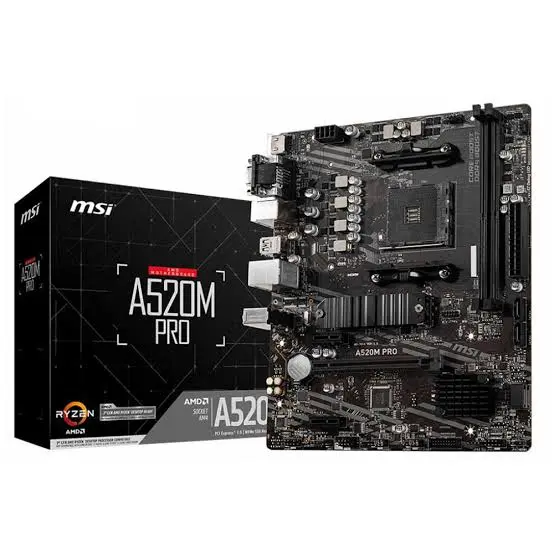
The MSI A520M‑A PRO DDR4, priced at PKR 22,500, offers a solid blend of features for budget‑conscious buyers without compromising on reliability. Its micro‑ATX form factor fits neatly into compact chassis, which is a plus when space is at a premium in crowded office cubicles.
Why You Actually Need MSI A520M A setup
In a city where summer temperatures routinely exceed 40 °C, heat‑induced throttling can cripple a poorly designed system. MSI A520M A setup includes an extended heatsink array on the VRM and chipset, helping maintain stable clock speeds even when the ambient temperature soars.
Power fluctuations are another daily reality; the board’s robust power delivery circuitry tolerates voltage dips without sudden shutdowns, protecting both the CPU and attached storage devices. This resilience translates into fewer emergency repairs and lower total cost of ownership for enterprises.
For developers and content creators who need reliable PCIe lanes for graphics or NVMe storage, MSI A520M A setup provides a full PCIe 3.0 x16 slot and an M.2 slot that supports up to 32 Gb/s. The result is a smooth workflow when rendering 4K video or compiling large codebases.
Because the motherboard supports DDR4 up to 4400 MHz, you can pair it with high‑speed memory modules that improve multitasking performance in office environments where dozens of applications run simultaneously.
Pakistan‑Specific Scenarios
Dust is a silent enemy in Karachi’s industrial districts, and the MSI A520M A setup’s fan headers are strategically placed to allow easy connection of dust‑filtering case fans. Proper airflow prevents the buildup of particulate matter on critical components.
When the national grid experiences load‑shedding, many businesses rely on UPS units. MSI A520M A setup’s BIOS includes an automatic power‑loss recovery feature that resumes the system without manual intervention after power is restored.
Humidity can cause corrosion on exposed contacts; the board’s gold‑plated memory slots and SATA connectors resist oxidation, extending the lifespan of the hardware even in monsoon season.
Local availability is strong; XG Enterprises maintains a steady inventory of MSI A520M‑A PRO DDR4 units, and we offer same‑day delivery within Karachi, reducing lead‑time for urgent deployments.
Pros & Cons for Daily Use
Pros: The MSI A520M A setup’s BIOS is user‑friendly, with clear menus for overclocking, fan curves, and power management, making it accessible to technicians who are not firmware experts.
Cons: The board lacks built‑in Wi‑Fi, which means a separate adapter is required for wireless connectivity—a minor inconvenience but worth noting for mobile office setups.
Pros: Its 4‑phase VRM design, while modest, is sufficient for AMD Ryzen 5 and Ryzen 7 processors, delivering stable power under sustained loads typical of office applications.
Cons: The audio codec is a basic Realtek ALC887, which is adequate for voice calls but not ideal for audiophiles seeking high‑fidelity sound.
Pros: The inclusion of dual M.2 slots provides flexibility for future storage upgrades, allowing businesses to start with a single SSD and add a second one as data needs grow.
Cons: The board’s rear I/O lacks USB‑C, which is increasingly common on modern peripherals; however, adapters can bridge this gap without significant cost.
📚 Related Reading
Final Practical Thoughts
For the average Pakistani buyer—whether a small‑business owner, a freelancer, or a university student—MSI A520M A setup offers a balanced mix of durability, performance, and affordability that aligns with local needs. Its heat‑management features and power‑loss recovery capabilities directly address the challenges posed by our hot climate and intermittent electricity.
If you plan to run the system in a dust‑prone environment, pair the motherboard with a quality case that includes dust filters and maintain a regular cleaning schedule. Investing in a reputable UPS will further safeguard the hardware against sudden outages.
Overall, the MSI A520M‑A PRO DDR4 is a sensible choice for anyone looking to build a reliable workstation without breaking the bank. Its availability through XG Enterprises ensures you can obtain the product quickly and receive local support if any issues arise.
For more technical details and the latest firmware updates, visit the official MSI product page here.
🔥 Limited Stock in Pakistan