








Hardware Review


ThinkStation P520 Workstation – Intel Xeon W-2135 Buying Guide | Is It Worth It Pakistan?
Why You Actually Need This
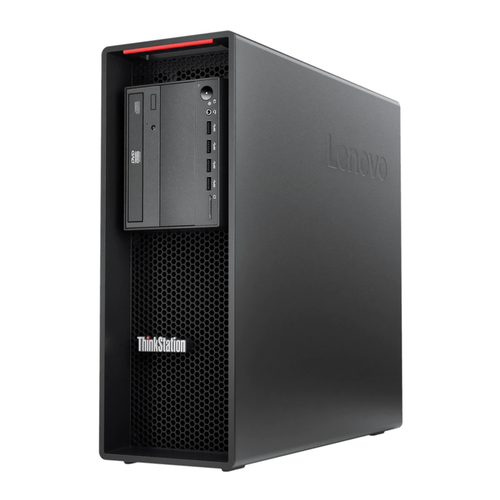
In the fast‑moving world of digital content creation, engineering simulation, and data‑intensive research, a workstation is no longer a luxury—it is a necessity. The ThinkStation P520, powered by an Intel Xeon W‑2135 processor clocked at 3.70 GHz with six cores, delivers the raw computational horsepower required to render high‑resolution 3D scenes, run finite‑element analysis, and crunch large datasets without the dreaded bottlenecks that plague consumer‑grade PCs. When you are tasked with generating photorealistic visual effects for a television commercial or performing a multi‑physics simulation for a bridge design, every millisecond of CPU time translates directly into project timelines and client satisfaction. The Xeon architecture, with its support for ECC (Error‑Correcting Code) memory, ensures that the massive 64 GB of DDR4 RAM you install remains free from silent data corruption—a critical factor when the integrity of a simulation could determine the safety of a real‑world structure.
Beyond raw CPU power, the P520’s graphics subsystem is a game‑changer for professionals who rely on GPU acceleration. The NVIDIA Quadro P4000, equipped with 8 GB of GDDR5 memory and four DisplayPort outputs, is purpose‑built for workstation workloads. Unlike consumer‑grade GPUs, the Quadro line offers certified drivers for industry‑standard applications such as Autodesk Maya, SolidWorks, and Adobe Premiere Pro. This certification eliminates the unpredictable crashes and rendering glitches that can cost hours of lost productivity. Moreover, the 8 GB VRAM provides ample headroom for handling complex shader networks, large texture atlases, and multi‑monitor setups, allowing designers to spread timelines, reference material, and 3D viewports across a seamless four‑screen canvas.
Storage speed is another pillar of a modern professional workflow, and the ThinkStation P520’s 1 TB NVMe M.2 SSD is engineered to keep up with the most demanding I/O patterns. Loading a multi‑gigabyte project file, swapping between massive video clips, or streaming raw footage from a high‑resolution camera becomes instantaneous, thanks to the SSD’s sub‑millisecond latency and sequential read/write speeds that often exceed 3 GB/s. This translates into tangible time savings: a video editor can ingest a 4K raw footage archive in a fraction of the time it would take on a traditional SATA SSD, and a CAD engineer can open a 2 GB assembly file without the dreaded “please wait” dialog. The combination of a fast CPU, professional GPU, and ultra‑responsive storage creates a harmonious ecosystem where each component amplifies the others, delivering a fluid, interruption‑free experience that is essential for meeting tight deadlines.
Finally, the inclusion of Windows 11 Pro adds a layer of enterprise‑grade security and management tools that are often missing from consumer operating systems. Features such as BitLocker device encryption, Windows Hello biometric authentication, and the ability to join a corporate Azure Active Directory make the P520 a secure endpoint for organizations handling sensitive data. For freelancers and small studios in Pakistan, this means you can protect client files, enforce strong password policies, and remotely wipe a device in case of theft—all without additional third‑party software. The operating system also supports Hyper‑V virtualization, allowing you to spin up isolated test environments for software development or run legacy applications that require older Windows versions. In sum, the ThinkStation P520 is not just a powerful machine; it is a comprehensive solution that addresses the entire lifecycle of professional work—from creation to security to deployment.
Dealing with Everyday Scenarios
Pakistan’s climate varies dramatically from the scorching heat of the plains to the humid monsoon season in the coastal regions, and these environmental factors can have a profound impact on the longevity and reliability of high‑performance hardware. The ThinkStation P520 is engineered with a robust thermal architecture that includes dual fan heat sinks, intelligently controlled fan curves, and a chassis designed for optimal airflow. In a typical Karachi summer, where ambient temperatures can soar above 40 °C, the workstation’s thermal sensors dynamically increase fan speed to maintain CPU and GPU temperatures within safe operating limits, typically below 85 °C under full load. This proactive cooling prevents thermal throttling, ensuring that the Xeon processor continues to deliver its advertised 3.70 GHz boost without dropping performance during long rendering sessions.
Dust is another pervasive challenge in many Pakistani cities, especially in industrial zones and during the dry season when sandstorms are common. The P520’s chassis incorporates dust filters on all intake vents, which can be easily removed and cleaned without disassembling the entire system. By regularly cleaning these filters—ideally once a month—you prevent fine particulate matter from settling on the heatsinks and fan blades, which would otherwise degrade cooling efficiency over time. Moreover, the workstation’s internal layout separates the power supply unit from the main processing bay, reducing the likelihood that dust‑laden airflow will interfere with the delicate components of the Xeon CPU and Quadro GPU. This design philosophy, combined with the use of high‑quality, sealed fans, gives the P520 a resilience that many standard desktop towers lack, making it a reliable workhorse even in the dust‑prone environments of Lahore or Faisalabad.
Power stability is a frequent concern across Pakistan, where voltage fluctuations and occasional brownouts can damage sensitive electronics. The ThinkStation P520 includes an integrated power‑management module that communicates with the BIOS to detect abnormal voltage spikes. When a surge is detected, the system can initiate a graceful shutdown, preserving data integrity and protecting the motherboard, SSD, and GPU from catastrophic failure. Additionally, the workstation’s power supply is certified for 80 PLUS Gold efficiency, meaning it operates with minimal heat generation and provides clean, stable power even when the grid is less than ideal. For professionals who cannot afford downtime, pairing the P520 with an uninterruptible power supply (UPS) is a prudent strategy, but the workstation’s built‑in safeguards already give you a solid first line of defense against erratic electricity.
Reliability also extends to software stability, and this is where the combination of Windows 11 Pro and the Quadro driver ecosystem shines. In Pakistan’s burgeoning animation and architectural visualization industry, teams often collaborate across multiple locations using shared network drives and cloud storage. The P520’s support for SMB3 and the latest NTFS features ensures fast, secure file transfers over local area networks, while the professional drivers guarantee that the GPU remains stable during prolonged GPU‑accelerated rendering sessions. Moreover, the workstation’s BIOS includes a “Secure Boot” option that prevents unauthorized firmware from loading, protecting against malware that could otherwise compromise a multi‑user environment. All these hardware and software safeguards converge to create a platform that can weather the everyday challenges of heat, dust, power instability, and collaborative workflows, making it an ideal investment for Pakistani professionals seeking uninterrupted productivity.
The Good and The Bad
- Pros:
- Xeon W‑2135 processor with ECC‑supported memory ensures data integrity for mission‑critical workloads.
- 64 GB DDR4 RAM provides ample headroom for multitasking, large 3D scenes, and heavy simulation models.
- 1 TB NVMe M.2 SSD delivers lightning‑fast load times and high I/O throughput for large media files.
- Quadro P4000 8 GB GPU with four DisplayPort outputs offers certified driver support for professional applications.
- Robust thermal design with dust filters and intelligent fan control keeps temperatures low in hot climates.
- Windows 11 Pro adds enterprise‑grade security, BitLocker encryption, and Hyper‑V virtualization.
- 80 PLUS Gold power supply provides efficient, stable power delivery and protects against voltage spikes.
- Expandable chassis allows future upgrades of storage, memory, and GPU.
- Cons:
- Price point of PKR 268,061 may be steep for freelancers or small studios on a tight budget.
- Form factor is a traditional tower, which may require more desk space compared to compact workstations.
- Only six CPU cores; while sufficient for most professional tasks, highly parallel workloads could benefit from a higher‑core count.
- Quadro P4000, though solid, is not the latest generation GPU; newer RTX‑based Quadro cards offer ray‑tracing acceleration.
- Limited USB‑C ports; users may need adapters for modern peripherals.
📚 Related Articles
Final Thoughts
If you are a professional who routinely works with demanding 3D modeling, video editing, or engineering simulation software, the ThinkStation P520 offers a balanced combination of processing power, graphics performance, and reliability that is hard to match at its price point in the Pakistani market. The Xeon processor’s ECC memory support, coupled with a high‑capacity NVMe SSD, ensures that you can tackle large projects without fearing data loss or sluggish load times. The Quadro P4000’s certified drivers further guarantee stability in the software suites that form the backbone of creative and technical industries.
However, the decision should also factor in your specific workflow and budget constraints. For freelancers who primarily work on 2D design or light video editing, a high‑end consumer PC might deliver comparable performance at a lower cost. Conversely, for studios that require 24/7 uptime, the workstation’s robust thermal design, dust‑filter maintenance features, and power‑management safeguards make it a prudent long‑term investment, especially in regions where environmental challenges are a daily reality. Consider your upgrade path as well; the P520’s expandable chassis means you can future‑proof your setup by adding more RAM, storage, or even a newer GPU when your budget allows.
In conclusion, the ThinkStation P520 stands out as a work‑ready, Pakistan‑friendly solution that balances raw performance with durability and security. Its price reflects the premium components and professional support that come with a Lenovo workstation, and for businesses or serious creators who cannot afford downtime, the cost is justified. Evaluate your current project requirements, anticipate future growth, and weigh the long‑term benefits of a stable, high‑performance platform against the upfront investment. If those calculations align, the P520 is not just a computer—it is a productivity partner built to thrive in the unique conditions of Pakistan’s tech landscape.
🔥 Limited Stock Available in Pakistan
Check Latest ThinkStation P520 Workstation – Intel Xe Price →