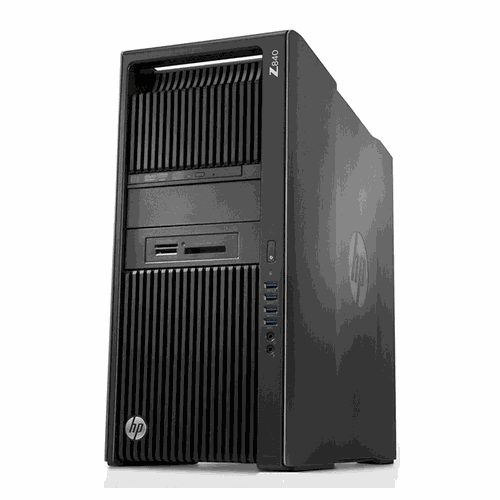

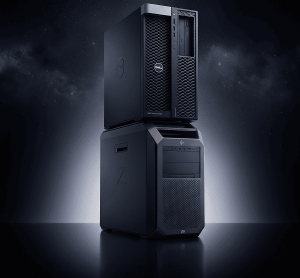









HP Z840 MT setup

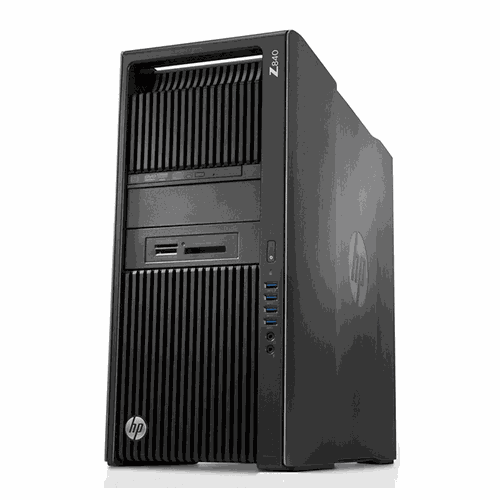
HP Z840 MT setup – Practical Guide Pakistan 2026
Tags: Buyer Guide, Practical Tech, Setup Guide
Category: Buying Guides
Why You Actually Need HP Z840 MT setup
HP Z840 MT setup is the backbone for small‑to‑medium enterprises that require reliable rendering, simulation, or data‑analysis capabilities without moving to a full‑blown server farm. The dual Xeon E5‑2690 v3 processors deliver 24 physical cores, which means multi‑threaded applications finish in a fraction of the time compared to consumer‑grade laptops.
When your design team works with Autodesk, SolidWorks, or Adobe Creative Cloud, the workstation’s 64 GB DDR4 memory and NVIDIA Quadro K2200 GPU eliminate bottlenecks that typically cause frame drops or long export queues. This translates directly into higher billable hours and tighter project deadlines.
HP Z840 MT setup also offers a level of expandability that future‑proofs your investment; you can add NVMe SSDs, upgrade the GPU, or increase RAM in 16 GB increments as workloads evolve. The modular design means you won’t need a complete replacement when a new software version demands more horsepower.
From a security standpoint, Windows 10 Professional provides BitLocker encryption and Group Policy management, which are essential for protecting client data in regulated industries like engineering consultancy or financial modeling. The workstation’s built‑in TPM 2.0 chip further hardens the system against tampering.
Finally, the price point of PKR 239,528 positions the HP Z840 MT as a cost‑effective alternative to higher‑end workstations that often exceed PKR 500,000, delivering enterprise‑grade performance at a fraction of the cost.
Pakistan-Specific Scenarios
Pakistan’s summer temperatures regularly climb above 40 °C, and the HP Z840 MT setup must be prepared for sustained high‑heat operation. Installing high‑quality, dust‑filtered intake fans and using a closed‑loop liquid‑cooling solution for the CPUs can keep core temperatures under 80 °C even during peak loads.
Dust is another silent killer in Karachi’s coastal environment; a simple maintenance schedule of weekly vacuuming of the chassis vents, combined with anti‑static brush cleaning of the heatsinks, will extend component life by years. Consider using a positive‑pressure case design to push dust out rather than let it settle inside.
Power reliability is a chronic concern, with load‑shedding and voltage fluctuations common across the country. Pair the HP Z840 MT setup with an uninterruptible power supply (UPS) that provides at least 10 minutes of runtime at full load, and use a line‑conditioner to smooth out spikes that could damage the motherboard or SSDs.
When deploying the workstation in a small office, route the power cable through a surge‑protected power strip and enable the BIOS power‑loss recovery feature so the system automatically resumes after an outage. This eliminates the need for manual reboots and reduces downtime.
For field engineers who need to transport the unit between sites, invest in a rugged, lockable rolling case with foam cutouts; this protects the HP Z840 MT setup from mechanical shocks and humidity while maintaining easy accessibility.
Pros & Cons for Daily Use
Pros: The dual Xeon architecture provides unmatched multi‑threaded performance for CAD, 3D rendering, and scientific simulations. The workstation’s 64 GB DDR4 memory ensures smooth multitasking, while the Quadro K2200’s certified drivers guarantee stability in professional graphics applications.
The inclusion of a 1 TB HDD offers ample bulk storage for project archives, and the system’s PCIe slots allow for future SSD upgrades that can dramatically improve read/write speeds. Moreover, the HP Z840 MT setup comes with a comprehensive warranty and on‑site support from XG Enterprises, which is critical for minimizing downtime.
Cons: The workstation’s power consumption can exceed 400 W under full load, which may increase electricity costs and put additional strain on backup solutions. Additionally, the base configuration lacks an NVMe drive, so users must budget extra for a fast boot drive if needed.
Another consideration is the size and weight; the tower measures over 45 cm in height and weighs more than 20 kg, making it less portable than smaller workstations. Finally, while the Quadro K2200 is reliable, it may struggle with the most demanding real‑time ray tracing workloads compared to newer RTX GPUs.
📚 Related Reading
Final Practical Thoughts
For the average Pakistani buyer, the HP Z840 MT setup represents a balanced blend of raw compute power, expandability, and local support that aligns with the country’s climatic and electrical realities. By investing in proper cooling, dust mitigation, and UPS protection, you can extract the maximum lifespan from the machine.
If your workflow revolves around heavy 3D modeling, finite‑element analysis, or large‑scale data processing, the dual Xeon platform will pay for itself in reduced rendering times and higher productivity. However, if your tasks are primarily office‑based or lightly graphical, a lower‑tier workstation might be more cost‑effective.
We recommend purchasing the HP Z840 MT from XG Enterprises, where you receive a pre‑configured unit, on‑site installation assistance, and a one‑year extended warranty that covers parts and labor. This local service network is invaluable when dealing with unexpected hardware failures in a region where shipping to overseas service centers can take weeks.
In summary, the HP Z840 MT setup is a solid investment for businesses that demand performance, reliability, and future‑proofing in a challenging environment. With proper thermal management, power conditioning, and regular maintenance, this workstation will serve as a dependable workhorse for years to come.
For more technical details on Xeon processor specifications, visit the official Intel page here.
🔥 Limited Stock in Pakistan